Chrome Web Store Ranking Factors: What 120K Records Show

Joseph Hu
- #Chrome Web Store SEO
- #Chrome Web Store Ranking
Many Chrome extension devs already recognize the importance of Chrome Web Store rankings. But when they actually start, they still don't know where to begin - what factors influence ranking? And where should they focus for the biggest impact?
To answer these questions, I collected 120,000 public ranking records from the Chrome Web Store, built a prediction model, and identified the public signals most correlated with rankings. I previously shared some of the findings on X and Reddit, which sparked some discussion. This article is the full version — with a more detailed analysis, complete conclusions, and what I did with these findings afterwards.
What Data Did I Analyze
Over a 30-day period, I collected the top 20 search results for roughly 900 keywords in the Chrome Web Store — about 120,000 records in total. Each record includes the search keyword, ranks, and the extension's title, summary, description, weekly users, rating, number of reviews, and version.
Drawing on insights from other developers and my own experience, I extracted 26 public features and trained a ranking prediction model. The model showed a clear priority: which signals matter most for rankings, and which matter least.
The model's predictions differ from actual rankings by about 4 positions on average. That might sound rough, but consider what's missing — install rate, uninstall rate, click-through rate, and other metrics Chrome Web Store keeps private. Achieving this accuracy with public signals alone tells us something important: these observable signals already explain a large part of how rankings work.
Key Findings
The Ranking Logic in One Sentence
What your listing says determines which ranking tier you can enter. Your product performance (weekly users, ratings, reviews, badges) determines where you rank within that tier.
The Four Dimensions Most Correlated with Rankings
Based on feature weights from the model, the public signals that influence rankings fall into four categories. From highest to lowest importance:
Relevance
Your title, summary, and description together determine how relevant your extension is to a user's search. If all three fields contain the user's search keywords, the ranking system treats your extension as a match for what the user is looking for.
Weekly Users
Weekly users is public data. It reflects, to some extent, an extension's install base and how active its users are. Once weekly users reaches a certain scale, rankings enter a positive feedback loop — more visibility brings more users, and more users push rankings higher.
Ratings and Reviews
High ratings reflect product quality. A sufficient number of reviews adds credibility. Both influence rankings, but they take time to build.
Badges
Featured and Verified Publisher badges still help with rankings, but their weight is much lower than most developers assume. If you're waiting for a Featured badge to save your rankings, you're probably looking in the wrong direction.
Tiered Buckets: How Your Ranking Ceiling Is Set
These four factors don't simply add up into a total score. Based on how rankings cluster and shift in the data, they appear to work in layers:
- Relevance is the bucket selector. Your title, summary, and description determine which ranking tier you qualify for — say, positions 1-5 versus 6-10.
- Product performance is the in-bucket sorter. Once you're in a tier, weekly users, ratings, and reviews determine your exact position within it.
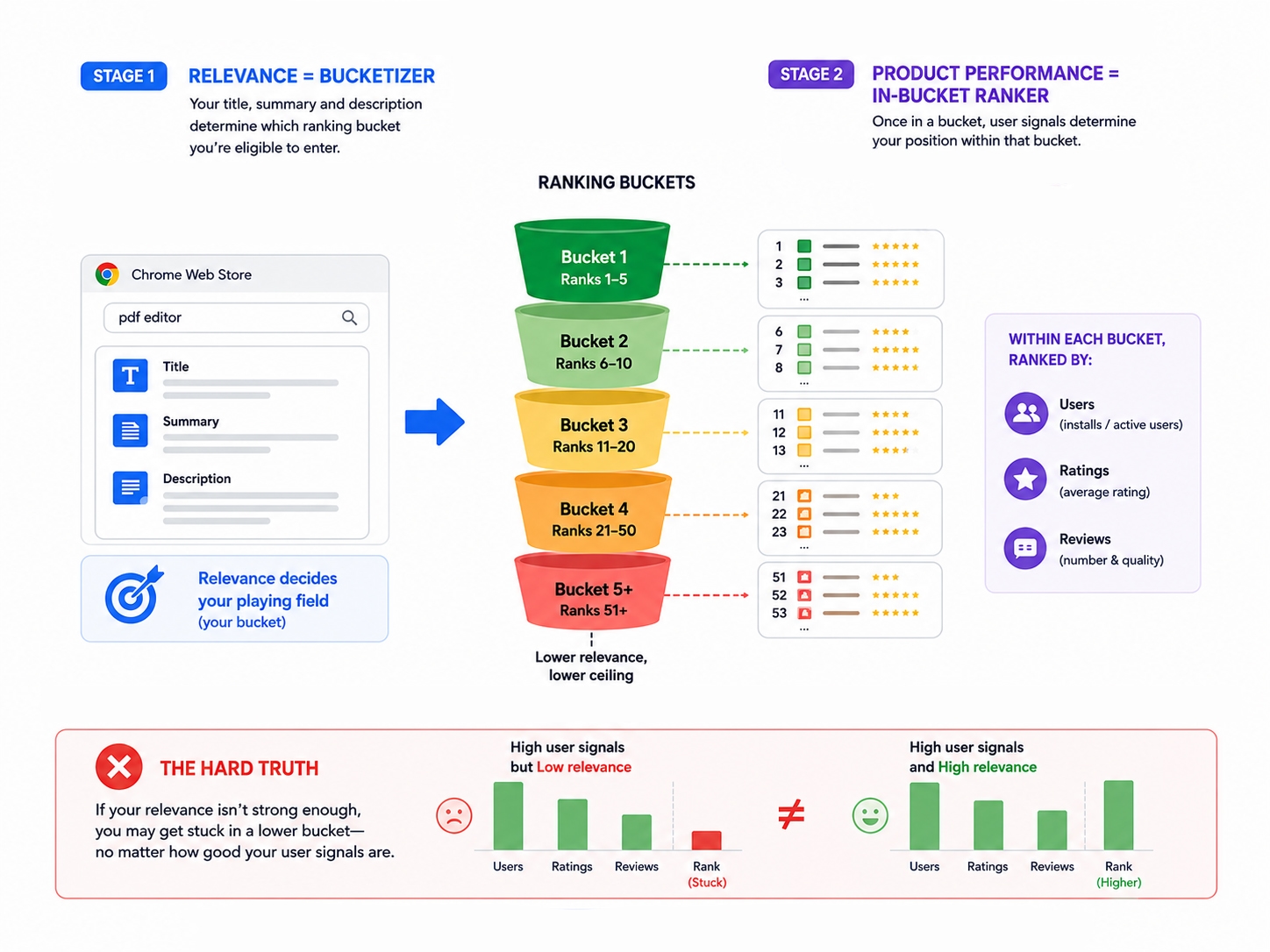
The implication: if your relevance is weak, even strong product metrics won't push you into a higher tier. Your ranking ceiling isn't set by weekly users. It's set by how relevant your listing is.
What This Means If You're in Cold Start
If your extension just launched and has very few users, these findings are actually good news.
Rankings aren't determined by number of the weekly users. Relevance is what decides which ranking tier you can enter. And it's the only factor among the four that you can fully control. You don't need to wait for your user base to grow before you can rank well. You need your listing to match what users are searching for.
In many cases, extensions with fewer users but stronger relevance rank above competitors with far larger user bases. This tells us that cold-start extensions aren't out of the game. The opportunity is there, just hiding in a place most developers don't prioritize.
Once you understand tiered buckets, the growth path becomes clear: optimize relevance to enter a higher ranking tier → gain search visibility → attract initial users and reviews → product performance pushes you higher within the tier → more visibility → more users.
This cycle starts with relevance. If your listing doesn't match what people are searching for, you won't even make it into a competitive tier. Everything downstream depends on that first step.
So the first thing to do during cold start isn't posting on social media to pull in users. It's making sure your extension can be found in the right searches. Growth on the Chrome Web Store doesn't just happen when your product gets better. It can be engineered.
Does It Actually Work?
To validate these ranking patterns in practice, I built the prediction model into the Extension Ranker Ranking Audit, turning it into a tool that diagnoses listing issues and provides specific optimization guidance.
Then I tested it on one of my own new extensions. The extension had just 8 users at the time, and its ranking for the target keyword "ChatGPT Chat Organizer" was #15. I optimized the listing based on the model's suggestions. A few days later, the ranking jumped to #3.
The reason it worked comes back to the core finding of this analysis: many factors influence Chrome Web Store rankings, but only one is fully in your control: relevance. Fortunately, it's also the one that matters most.
The next step is to optimize the Chrome Web Store listing against the same competitive evidence and then track the keyword ranking after the new listing is published.