DEMAND
Is there evidence that people search for this term?
See the global 12-month average search volume as a demand signal before you commit to the keyword.
Avoid spending time on keywords with little demand—or competitors you're unlikely to outrank.
Not ready to sign up? Check any extension's rank free →
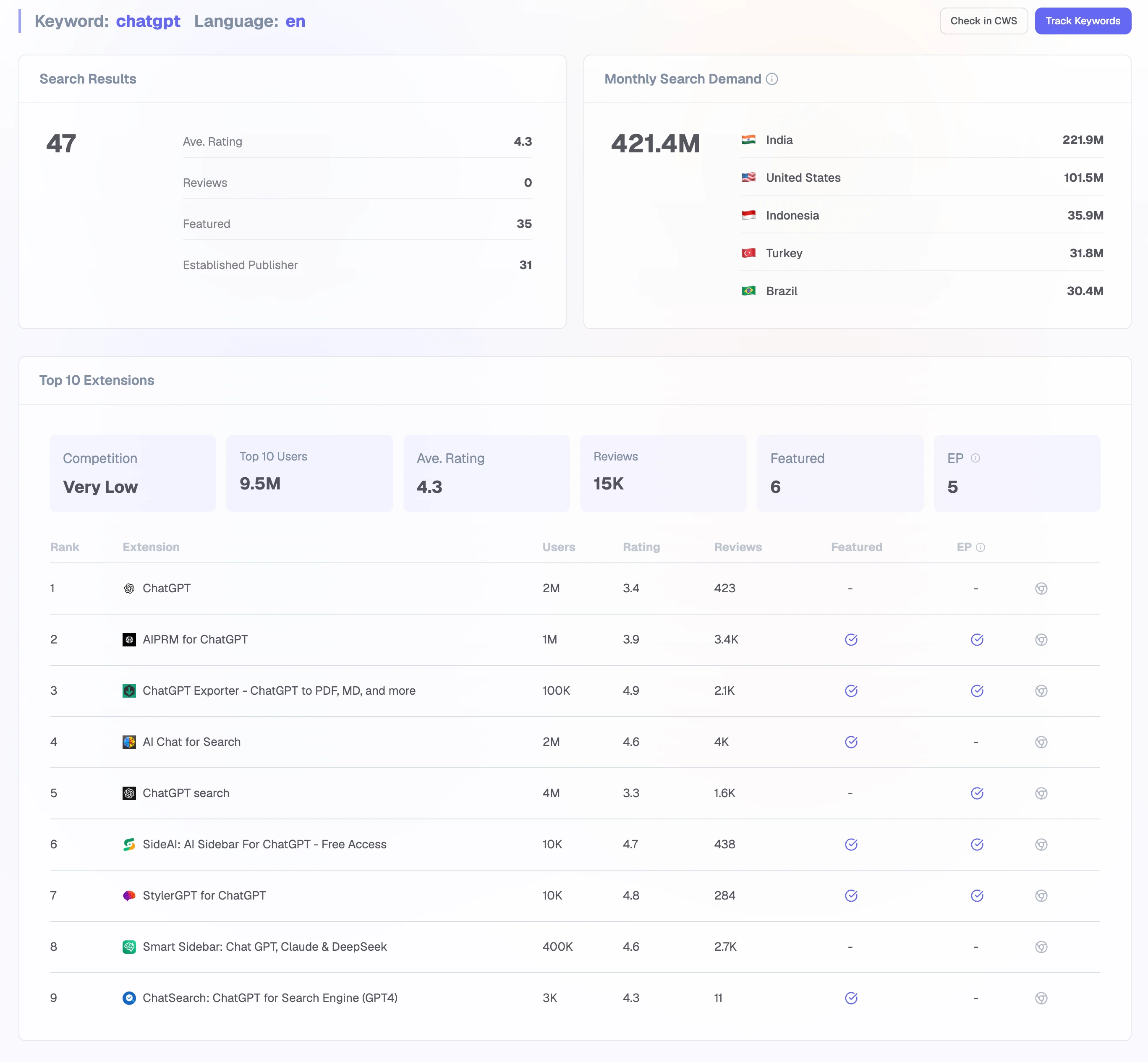
Combining global search demand with the current Chrome Web Store results.
THE DECISION
Keyword Insights separates real demand from competitive reality, and shows you the store evidence behind both.
DEMAND
See the global 12-month average search volume as a demand signal before you commit to the keyword.
COMPETITION
Estimate difficulty from what the top results actually have: users, ratings, reviews, Featured badges, and publisher status.
RESULTS
Inspect the extensions ranking for this keyword before committing it to tracking or optimization.
PRODUCT FLOW
The workflow keeps external demand and Chrome Web Store competition separate until both can inform the next action.
Start with a candidate from Keywords Explorer or type a term you are already considering.
Select the country and language context used to retrieve and interpret the search results.
Read monthly search demand beside the competition level and the current Top 10.
Track the keyword, audit the current position, or reject the candidate before investing more work.
THE EVIDENCE
Each number tells you what it measures and where it came from, so you can weigh the decision on evidence instead of a black-box score.
DEMAND
The latest 12-month global average for the keyword, showing how much the term is actually searched each month.
RESULT COUNT
How many extensions rank for this keyword in the analyzed market.
COMPETITION
A difficulty read derived from how strong the current top results are.
TOP 10 STRENGTH
Users, ratings, reviews, Featured badges, and Established Publisher status for every extension in the current Top 10.
PRODUCT QUESTIONS
No. Chrome Web Store does not publish official keyword volume. Extension Ranker uses the latest available global 12-month average from Google as an external reference signal.
It is a heuristic derived from the visible strength of the current Chrome Web Store top results. It is not an official metric or a ranking probability.
They reveal the users, ratings, reviews, badges, and publisher strength already present in the part of the result set you would need to compete with.
Add it to Ranking Tracker to establish a baseline or run Ranking Audit to understand what currently limits the extension's position.
DIAGNOSE THE TARGET
Turn the chosen target into a diagnosis against the extensions currently winning the search.