How Floto Extension Grew from 329 to 10K Users in 30 days
How Floto grew from 329 to 10K Chrome extension users in one month through influencer marketing, product repositioning, and distribution.
9 min read

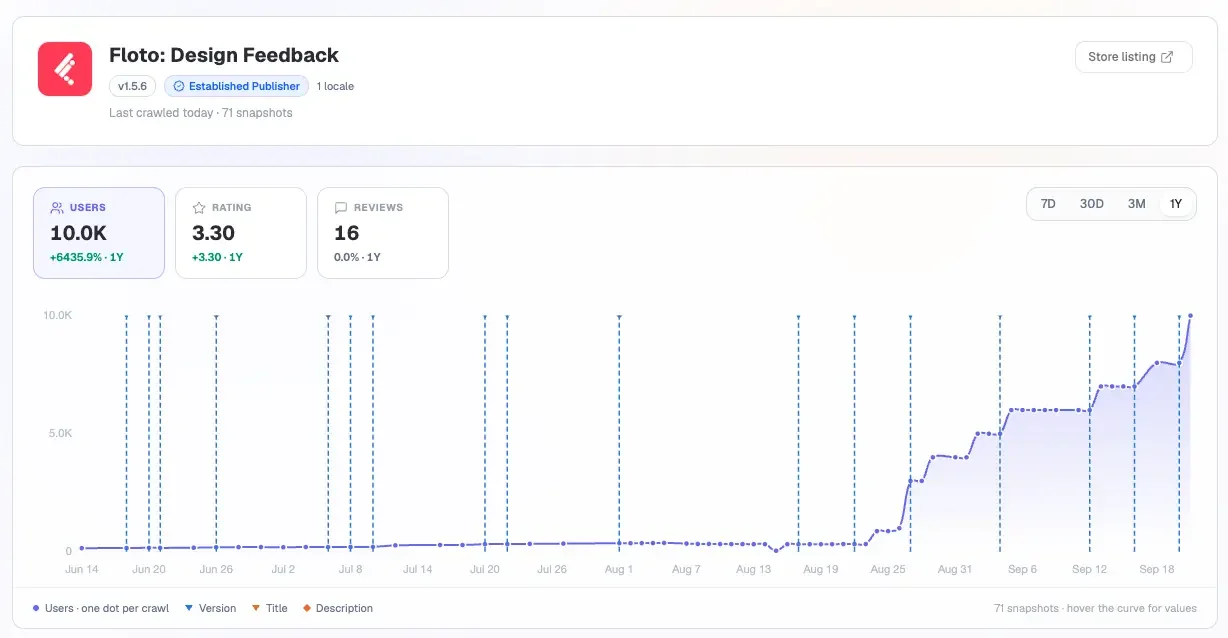
For more than 6 monthes, Floto's Chrome extension struggled to break 400 users. Then, in less than a month, its user count jumped from 329 to over 10,000.
I came across this unusual growth pattern while tracking Chrome extensions with Extension Ranker. A relatively flat line had suddenly turned into a steep upward curve.
What happened? Was it a successful marketing campaign? A product update? Or had Floto finally found the right audience?
To find out, I dug into its historical Chrome Web Store data, social media activity, product launches, and public conversations with users. What I found was more interesting than a single successful campaign.
The First Clue: A Surge in Creator Content
Adding nearly 10,000 users in such a short period seemed unlikely to be organic, so I started with Floto's marketing activity around the time the curve began to accelerate.
It didn't take long to find something on Instagram. Starting on August 14, creators began publishing videos featuring Floto's Chrome extension. The concept was straightforward: open a website, use Floto to identify design, copy, and usability issues, then pass the suggested fixes to AI coding tools like Claude Code or Cursor.
More videos appeared on August 20. By August 24, several creators were posting about Floto, including Instagram Collab posts published jointly with Floto's official account. Around the same time, the extension's user count began climbing rapidly, and similar content kept appearing as it grew.

Creator partnerships looked like the obvious explanation. But there was a problem with it.
Floto had been experimenting with influencer marketing long before August. The team had also promoted the product through Product Hunt, Figma Community, and LinkedIn, and the Chrome extension had been available since February. So why hadn't those earlier efforts produced a similar spike?
To understand that, we need to look at what Floto was actually selling during its first six months.
Why Early Marketing Didn't Drive Growth
It Started as a Figma-Focused Tool
Floto's Chrome extension wasn't always positioned as an AI website review tool. Originally called Design Diff by Floto, it served a much narrower purpose: helping designers and development teams check whether a live website matched its original Figma design.
The Figma plugin provided the original design, the Chrome extension captured the live website, and Floto compared the two for differences in layout, colors, spacing, and other visual details. For teams maintaining design consistency, this was useful. But it meant the extension depended on Figma. Without a Figma design to compare against, most users had little reason to install it.
That dependency shaped how every early channel performed.
Figma Community: Reaching Users Where They Already Work
In a LinkedIn post, Floto's founder mentioned that early users were discovering the product through friends, creators they followed, and searches on Figma Community. That made sense: Floto was solving a problem inside the Figma workflow, and that audience could immediately understand the value.
But discovering Floto through Figma didn't mean installing its Chrome extension. Those users might have come for the Figma plugin's other features instead.
Creator Sponsorships Aimed at Designers
Floto was also working with creators before August. Designer Punit Chawla published a sponsored LinkedIn post introducing Floto's design audits, simulated user testing, and prototype review, with an invitation code for extra usage credits. The link in the comments, however, led to Floto's Figma plugin, not the Chrome Web Store.
So the absence of growth in Chrome extension users doesn't necessarily mean the campaign failed. It may have been driving adoption of a different part of the product.
A Product Hunt Launch Around a Specific Problem
Floto also launched Design Diff on Product Hunt. In his launch announcement, the founder explained how the extension could capture a live webpage, connect it to a Figma frame, and send identified issues to tools like Linear or Jira. Instead of manually screenshotting, annotating, and comparing pages against design files, designers could automate much of the process.
It was a clear problem with an understandable solution. The launch brought exposure, but it didn't remove the extension's dependence on Figma.
Distribution Wasn't the Problem
Looking back at the first six months, Floto's channels were reasonably aligned with its original audience: designers, reached through Figma Community, design creators, and launch platforms. Floto was getting its product in front of people. The bigger question was whether enough of those people needed the Chrome extension.
The Turning Point
An Interesting Question on AppSumo
Another channel caught my attention: AppSumo. Floto had listed lifetime deals there, with a page focused on Figma design audits, persona testing, flow analysis, and Design Diff. Beyond sales, AppSumo let potential customers ask questions before buying, and one of those questions exposed the limitation.
On July 27, a potential customer asked about using the Chrome extension without Figma. They weren't building from design files; they simply wanted to review a web application they were developing. If the extension only supported Design Diff, they explained, it wouldn't be particularly useful to them.
Floto's founder responded that Design Diff was indeed the extension's primary feature at the time. But the team was shipping an update the next day that would let users review live websites directly, without a Figma file. The extension would identify usability, copywriting, and accessibility issues, and generate prompts users could pass to AI coding agents.
That was a significant change.
A New Reason to Exist
When I returned to Floto's historical Chrome Web Store data in Extension Ranker, the shift was clear. The earlier listing emphasized comparing Figma designs with implemented websites. The updated description focused on reviewing live webpages for UI, copy, usability, and accessibility issues, and on generating actionable prompts for tools like Cursor and Claude Code.
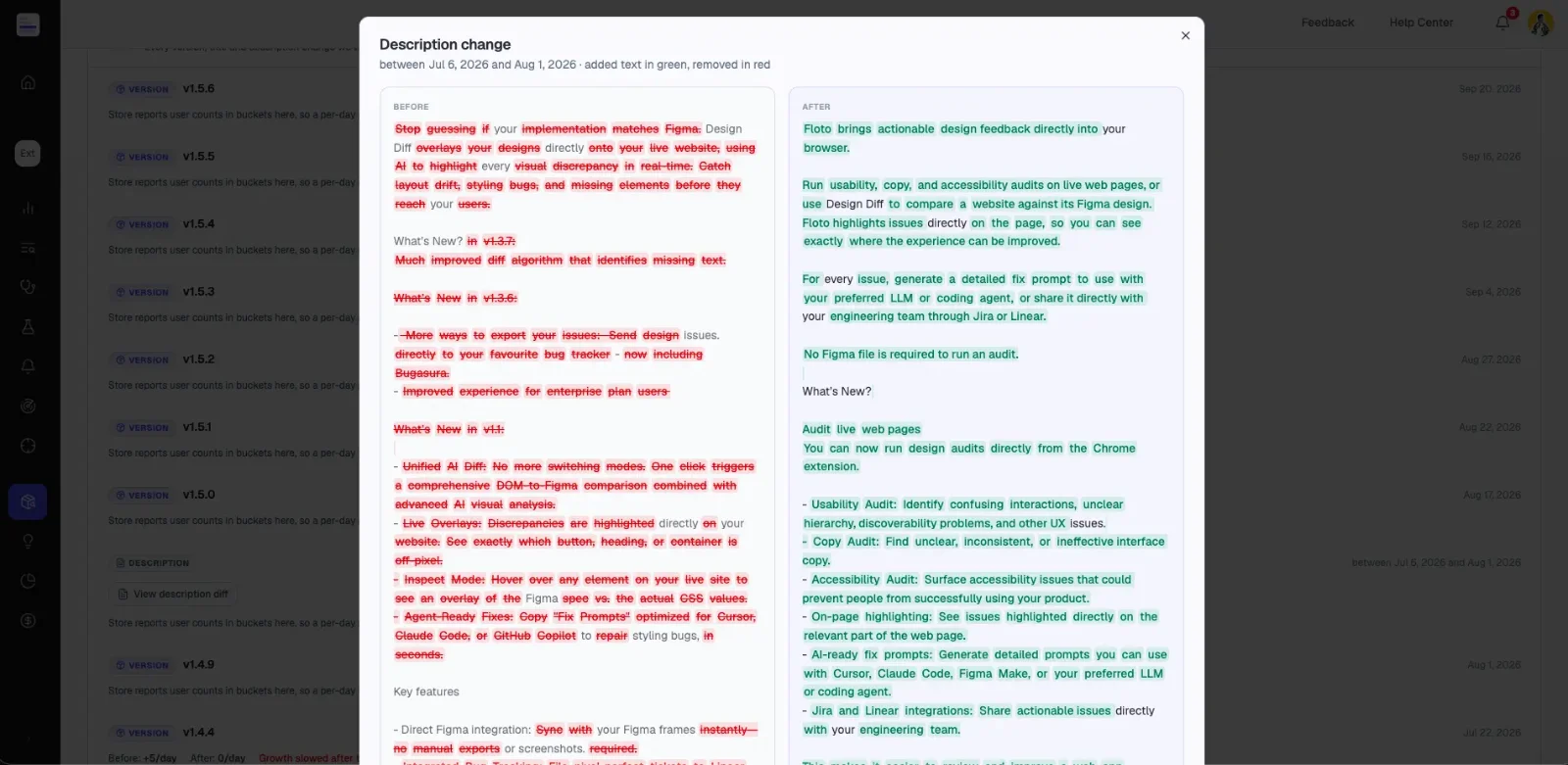
Design Diff was still part of the product, but the extension now supported a use case that didn't require Figma at all. The founder later discussed this direction on LinkedIn: the team wanted to bring its designer feedback capabilities to a wider group of builders, anticipating demand as AI-assisted development grew.
This made me look at those August Instagram videos differently. The creators weren't demonstrating a tool that required viewers to understand Figma or design handoff. They were showing something a much broader audience could relate to:
You've built a website. Now let AI help you find and fix what's wrong with it.
A Broader Product Meets a More Relevant Distribution Strategy
There's one important detail in the timeline. Floto's growth didn't take off immediately after the new use case was introduced. The surge came later, around the time Instagram creators began publishing content about the updated extension.
That doesn't prove either the positioning change or influencer marketing was solely responsible. Without Floto's internal acquisition data, we can't tell how many installs came from each channel.
But the sequence is worth paying attention to. Floto first expanded the audience its extension could serve. Its marketing then began demonstrating the product to that audience, with a direct path to the extension itself. That combination is a more useful explanation than a single viral campaign.
What Chrome Extension Developers Can Learn from Floto
Not every tactic will work for every product, but Floto's experience offers useful ideas for reaching users, validating demand, and improving distribution.
Start Where Your Users Already Work
If your extension supports a specific platform or workflow, its community may be the best place to start. Floto's early focus on Figma Community and design creators fit its original product. Likewise, if your extension improves a particular website, research that website's community:
- Where do users discuss their workflows?
- What repetitive tasks do they complain about?
- Which third-party tools do they already recommend to each other?
These conversations show you both where to reach users and how to describe your product in terms they recognize. Start with the workflow, not the platform's audience size: a small community that regularly hits your problem beats a large one with little reason to install.
Product Hunt: Build Your Launch Around a Specific Problem
Floto's Design Diff launch didn't present every capability in the Floto ecosystem. It focused on one problem, which made the product easy to understand. If your extension has several features, choose one compelling use case as the centerpiece: what the user is trying to accomplish, where the existing workflow falls short, and how your extension helps.
After launching, look beyond upvotes and comments:
- How many visitors reach your Chrome Web Store listing?
- How many install the extension?
- How many complete the first meaningful action?
AppSumo: Learn from People Who Are Considering Paying
Potential AppSumo buyers ask detailed questions before purchasing, and those questions reveal a lot:
- What are people trying to accomplish?
- Which missing features are stopping them from buying?
- Which assumptions about the product need clarifying?
Floto's July 27 conversation exposed a use case its original positioning didn't address. Even if you don't plan to sell on AppSumo, studying the public questions and reviews of similar products can surface unmet needs from people actively looking for a solution.
One caution: lifetime deals are risky for AI-powered extensions with ongoing inference or API costs. Think through usage limits, long-term service costs, and support before offering lifetime access.
Content Marketing: Connect the Audience, the Demo, and the Installation
The most interesting thing about Floto's later creator campaigns was how clearly the product fit into a real task. You don't need a sponsorship budget to apply the same principles.
Know Who You're Creating Content For
The same extension can appeal to different audiences for different reasons. For designers, Floto could show how to check a site against its Figma design; for people building with AI, how to catch issues before publishing. Before creating content, define:
- Who is this content for?
- What is the person trying to accomplish?
- At what point would they need your extension?
Demonstrate a Complete Task, Not a List of Features
Floto's later videos showed a practical workflow: open a website, identify problems, generate fixes, send them to an AI coding tool. That's more compelling than listing features like AI analysis or accessibility checks. Show one task end to end:
- What problem does the user encounter?
- What does your extension do about it?
- What changes after the task is done?
If explaining why someone should install takes several minutes, you may need a more specific use case.
Give Viewers a Clear Next Step
Some creators asked viewers to comment with a keyword to receive a link; others told them to search for Floto in the Chrome Web Store. Punit Chawla's earlier post gave a direct Figma plugin link plus an invitation code. Each gave viewers a way in, but the destination matters: if you're promoting a Chrome extension, the link should lead to the experience you demonstrated.
Before publishing, follow the whole journey yourself: watch, click, land, and try the featured functionality.
- Is the next step obvious?
- Can someone find the feature you just demonstrated?
- Does the link point to the Chrome Web Store, your website, or another product?
Compare Your Content Timeline with Your Growth Data
Floto's creator content appeared at several points: some before the surge, some during it. Looking at a single video would have given an incomplete explanation. Track your whole content timeline instead: when each piece went out, which audience it targeted, and where it sent viewers. Then compare it with changes in installs and activity.
Unique tracking links or invitation codes help separate campaigns. They won't solve every attribution problem, but they move you beyond views and impressions.
Why I Track Chrome Extension Growth
If you visit Floto's Chrome Web Store listing today, you'll see an AI-powered website feedback tool with more than 10,000 users. You won't see the months with only a few hundred users, the original Figma-focused purpose, or the change in audience and marketing before the surge.
That's where historical data helps. Extension Ranker showed me when Floto's growth changed and how its listing evolved. From there, I could investigate the surrounding events through Product Hunt announcements, creator content, and AppSumo conversations. Public user counts can't tell us which channel generated each install, but they help us ask better questions:
- Why did growth accelerate at this particular moment?
- What had changed in the product before that happened?
- Who was the product trying to reach?
- Where were its marketing campaigns directing potential users?
The next time you notice a Chrome extension suddenly gaining users, don't just look at how fast it's growing. Look at what changed before the growth began.

Keep reading
TRY IT ON YOUR EXTENSION
Know what drives your installs
Track your Chrome Web Store rankings alongside your growth and see which changes pay off.